View & Print
Open, inspect and print PDF, DWG, DXF and many other technical file formats.

View, print, annotate, measure and convert PDF, DWG, DXF, DWF, TIFF, CGM, HPGL/2, PLT and other technical file formats with one powerful Windows application.
Open, inspect and print PDF, DWG, DXF and many other technical file formats.
Add markups, dimensions and measurements for review and technical workflows.
Convert individual files or process large groups of documents using batch tools.
Merge, split, watermark, OCR, compare, optimize and create PDF/A documents.
Work with CAD drawings, PDF documents, plot files and scanned technical documents from a single Windows desktop application.
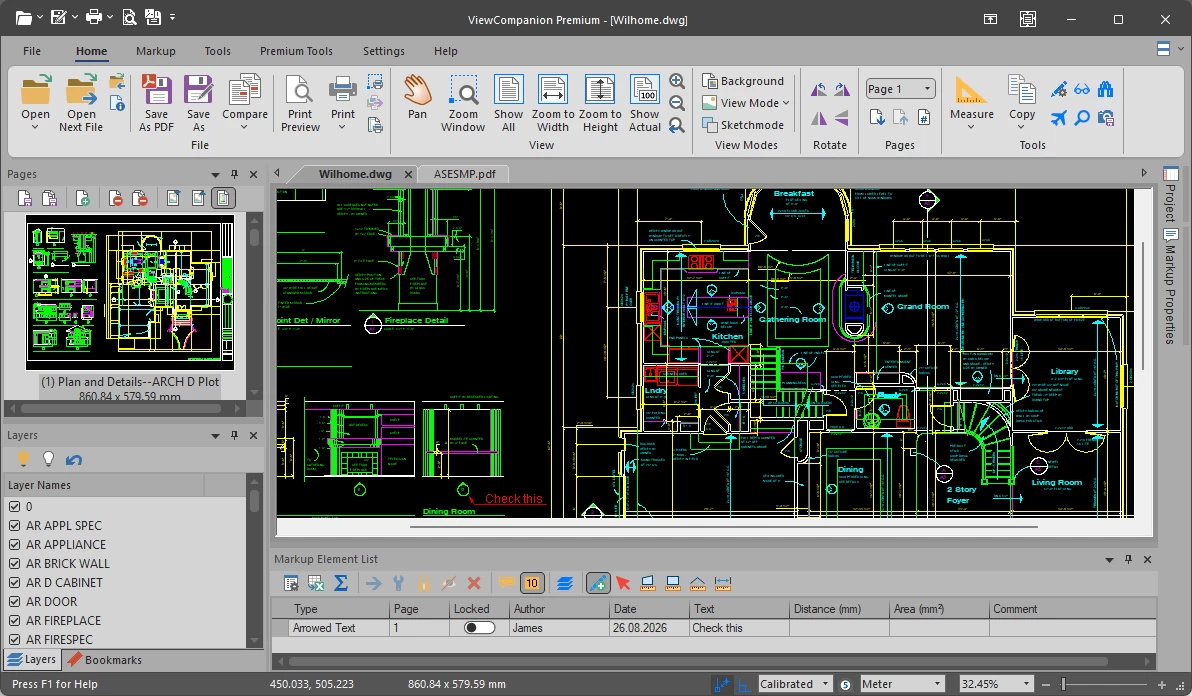
ViewCompanion Premium is the most powerful edition in the
ViewCompanion family,
combining AutoCAD DWG support
with powerful tools for viewing, printing, converting, annotating, measuring, and comparing technical drawings and documents.
It supports Adobe PDF, PDF/A,
AutoCAD DWG,
Autodesk DWF,
PLT,
CGM,
TIFF,
CALS and many other file formats.
ViewCompanion Premium includes powerful PDF and image-processing tools, with support for a wide range of output formats including PDF, PDF/A, DWG and DXF. See the complete list of supported output formats below.
Open, view and convert AutoCAD DWG files without AutoCAD installed.
ViewCompanion Premium also lets you print, batch print, annotate, measure, and compare DWG drawings using the same familiar tools
available for other supported technical drawing formats.
Learn more about DWG support in ViewCompanion Premium
Viewcompanion includes both batch conversion and batch printing.
You can also monitor a folder
for incoming files and automatically print or convert them using predefined settings.
This makes it easy to automate repetitive document-processing tasks and streamline high-volume workflows.
Use ViewCompanion to measure distances, dimensions, and areas directly in technical drawings and documents.
Measurement points can snap to drawing geometry, helping you select exact locations for precise results.
Measurements can be calibrated to the drawing scale, ensuring correct results even when a drawing is not at 1:1 scale.
Measurement data can also be exported to Excel (XLSX) or CSV for reporting, estimating, or further analysis.
Use the measurement and annotation tools to perform digital takeoffs directly from drawings and documents.
Learn more about digital takeoff in ViewCompanion
Use ViewCompanion to compare different revisions of a document or drawing and clearly visualize the differences.
All supported file formats can be compared, including PDF and DWG.
Multipage files can be compared page by page.
Learn more about file comparison in ViewCompanion
Add annotations and markups to technical drawings and documents using text, highlights, stamps, arrows, barcodes, symbols, images, freehand markup, and more.
Annotations are stored in a separate markup file, leaving the original document unchanged. Markups can be displayed as needed and included when printing or converting the document.
Learn more about annotation and markup tools in ViewCompanion
ViewCompanion Premium includes a wide range of tools for working with PDF files.
You can merge and split documents, rotate pages,
add watermarks, create searchable PDFs with OCR, convert PDF files to PDF/A, compare revisions, extract pages, optimize files,
and more.
These tools make it easier to prepare, organize, review, and archive PDF documents without using a separate PDF application.
The built-in PDF-to-CAD tools allow you to convert PDF files into editable AutoCAD DWG, DXF,
Gerber, CGM, and SVG formats, making it easy to reuse drawing data in CAD and engineering applications.
Learn more about PDF tools in ViewCompanion Premium
New to ViewCompanion?
Visit the Getting Started page for a quick introduction to the interface and basic features.
Learn how to open files, navigate documents, and perform common tasks such as viewing, annotating, comparing, and converting them.
The following file formats are classified as vector: PDF, CGM, DWF, DWFx, DWG, DXF, HPGL/2, PLT, IDW, Excellon, Gerber and Calcomp.
Notes:
A fully functional evaluation copy can be downloaded from our web site.
The downloaded product will run in evaluation mode for a period of 30 days.
If you want to continue to use the product after this period, you're required purchase a license.