
ViewCompanion Pro
View, Annotate, Compare, Print, and Convert Technical Files
ViewCompanion Pro is a feature-rich and easy to use application for viewing, printing, annotating and
converting many different file formats, including Adobe PDF,
Autodesk DWF,
PLT,
CGM,
TIFF, Calcomp,
CALS,
JPEG and PNG. Several other formats are supported, and you will find a complete list of all formats below.
Viewing
ViewCompanion will let you view your files fast and accurate. You have full control of zoom and pan by using mouse and keyboard. You will also find advanced viewing functions such as magnifier, overview window, compare, rotate and mirror. You may toggle between monochrome, color and grayscale view modes.
Conversion
Convert your files into a large
list of output formats that includes PDF, PDF/A, DWF, DXF, CALS, TIFF, PNG and JPEG.
Please see the complete list of supported output formats below.
You may use ViewCompanion to convert PLT, CGM and DWF files into Autodesk DXF format, which you can open in any major CAD application.
ViewCompanion includes batch conversion of all supported formats.
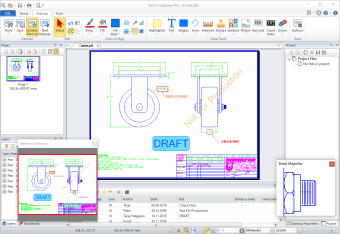
Markup and Annotation
With ViewCompanion Pro's markup feature you can annotate the viewed document, a process also commonly known as commenting.
The range of supported annotation elements includes stamps, text, symbols, dimension lines, area measurements, rectangles, circles, lines, polygons, arrows and pictures.
All markup elements are stored in a separate file, and the original file will not be modified.
The user can control whether the markup should be included when a file is printed or converted.
This makes it possible to review, share, and update annotations without changing the original document.
Measurement
With ViewCompanion you can do accurate distance and area measurements using snap-to-geometry for accurate point selection.
Measurement calibration ensures correct results even when drawings are not provided in the correct scale.
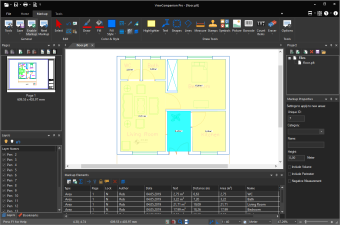
Digital Takeoff
ViewCompanion includes annotation tools for quick and accurate measurement of floorplans, drawings, and technical documents. Calibrate scale once and use snapping for precise length, area, and perimeter calculations. The counting tool lets you instantly tally items such as doors, windows, and symbols, and include all results in your Excel export.
Read more about how to perform digital takeoffs here.
Compare Revisions
ViewCompanion offers efficient file comparison using its overlay mode. Easily compare two revisions of the same drawing or document
by placing them on top of each other with color-coded highlighting.
Adjust colors and transparency to clearly visualize additions, removals, and modifications between revisions.
When finished, you can export or print the comparison result with all highlighted differences included.
Read more about ViewCompanion’s comparison functionality here.
Merge Multiple Files into One PDF
ViewCompanion can merge multiple files of different formats into a single multi-page PDF file.
This makes it easy to combine drawings, scanned documents, and reports into one organized and easy-to-share PDF document.
Printing
ViewCompanion offers full printing support, including batch, n-up, and poster printing.
Print your documents scaled or fit to page. Add custom watermark, banner, header and footer to the printed document. Print the whole document or only the displayed portion.
Read more about ViewCompanion's print functionality here.
Getting Started
New to ViewCompanion? Visit the Getting Started page for a quick introduction to the interface and basic features.
Learn how to open files, navigate documents, and perform common tasks such as viewing, annotating, comparing, and converting them.
Key Features
- View, markup, convert and print files of different formats.
- Convert your files to a large number of standard formats; see below for a list of all supported formats.
- Includes batch conversion and printing.
- Merge multiple PDF files into a single PDF.
- Easily add watermarks to your PDFs — whether you're working with a single file or processing multiple files in batches.
- Compare two files and visualize the differences.
- Annotate your files by adding text, images, polygons, symbols, stamps, dimension lines, measurement areas and more.
- Merge different files of all supported formats into a single multipage PDF, TIFF or DWF file.
- Split a multipage file into smaller files.
- View, convert and print documents in color, grayscale, or black and white.
- Print drawings and documents in full scale (1:1) or scaled-to-fit mode.
- Poster mode for printing big format drawings on multiple sheets, for example to print an A0 drawing in full size using multiple A4 sheets.
- Print in n-up mode, also known as multiple pages per sheet.
- Create your own pen table for full control of pen colors, styles and widths. Pens are used during printing and conversion.
- Overlay up to 10 files and print or convert as one drawing.
- Precise distance and area measurement with snap to drawing geometry.
- Use the mouse wheel for both zooming and panning.
- Copy selected region to clipboard and paste into another application.
- Open files directly from a ZIP archive.
- Delete pages from supported multipage formats, including PDF, PLT, TIFF, and DWF.
- Choose between a modern ribbon-style interface and a classic menu-and-toolbar layout.
You can also customize the application theme, including support for dark themes. - Use the Shell Extension for easy access to functions inside Explorer Window and a full preview of the selected file.
- An extensive set of command line parameters are available for conversion and printing.
ViewCompanion Pro can open and convert the following file formats:
- Adobe PDF
- Autodesk DWF and DWFx 2D
- Autodesk Inventor Drawings (IDW)(1)
- AVIF Image Format
- BMP (Windows Bitmap format)
- Calcomp Plotter Format
- CALS type 1 and 2
- CGM (Computer Graphics Metafile) (2)
- DCX (Multipage PCX)
- ECW (Enhanced Compression Wavelet)
- EDMICS C4 (Group 4 Tiled)
- EMF (Windows Enhanced Metafile)
- EMZ (Compressed Windows Enhanced Metafile)
- Excellon Drill Format
- Gerber RS-274D, RS-274X, X2 / X3
- GIF Image Format
- HEIC Image Format
- Intergraph Raster File Formats
- JPEG Image Format
- JPEG2000 Image Format
- JPEG XL Image Format
- PCX (PC Paintbrush format)
- PLT, HPGL, HPGL/2, HP-RTL and KIPGL files
- PNG (Portable Network Graphics)
- PSD (Adobe Photoshop)
- SFF (Structured Fax Format)
- TGA (Truevision Targa)
- TIFF (Tagged Image File Format) (3)
- WebP (Google Image Format for the WEB)
- WMF (Windows Metafile)
- Support for Autodesk Inventor IDW file format requires Autodesk Apprentice Server to be installed on the same computer.
Download Autodesk Apprentice Server 2027 here — available free of charge. - Supports CGM files using binary and clear text encoding. Supported profiles includes ATA, CALS, WEBCGM and CGM*PIP.
- Supported TIFF compression methods include Uncompressed, CCITT Group 3, CCITT Group 4, LZW, Deflate (ZIP), JPEG, and PackBits.
Additional document formats are supported when Microsoft Office or LibreOffice is installed:
- Microsoft® Excel
- Microsoft® PowerPoint
- Microsoft® Word
- OpenOffice Document Format
- RTF (Rich Text Format)
- Lotus Word Pro (1)
- Microsoft Visio (1)
- SVG (Scalable Vector Graphics) (1)
- WordPerfect (1)
- File formats marked with (1) are supported only when LibreOffice is installed.
Learn more about LibreOffice integration and how it extends the file format support available in ViewCompanion.
ViewCompanion Pro can convert to the following formats:
- Adobe PDF
- Adobe PDF/A(1)
- Autodesk DWF
- AVI (2)
- AVIF Image Format
- CALS CCITT Group 4 Raster (3)
- GIF Image Format
- HPGL-2
- HEIC Image Format
- JPEG Image Format
- JPEG2000 Image Format
- JPEG XL Image Format
- Paintbrush PCX
- Portable Network Graphics (PNG)
- TIFF Image Format (4)
- WebP Image Format
- Windows Bitmap
- Windows Enhanced Metafile
- Windows Metafile
- Adobe Postscript®
- Autodesk DXF
- Computer Graphics Metafile (CGM Binary)
- Gerber RS-274X
- Scalable Vector Graphics
The following file formats are vector-based: CGM, DWF, DWFx, HPGL/2, PLT, IDW, Excellon, Gerber, and Calcomp.
Conversion of PDF files to vector formats such as DWG, DXF, Gerber, CGM, and SVG is available in the Premium edition.
- The following PDF/A output variants are supported: PDF/A-1b, PDF/A-2b, PDF/A-3b, PDF/A-2u, PDF/A-3u, PDF/A-4 and PDF/A-4e.
- AVI files can be created by using the Movie Maker tool. This tool will let you add multiple files, of all the different formats ViewCompanion supports, to a movie. Each page from the added files will be converted to a single frame in the final movie file.
- MIL-PRF-28002B Type 1 (CALS Raster format used for technical drawings and document archiving).
- Supported compression methods for converted TIFF files include Uncompressed, CCITT Group 3, CCITT Group 4, LZW, Deflate (ZIP), JPEG, and PackBits.
- No additional applications or drivers are needed for conversion.
Download ViewCompanion Pro
A fully functional evaluation copy can be downloaded from our web site.
The downloaded product will run in evaluation mode for a period of 30 days.
If you want to continue to use the product after this period, you're required to purchase a license.
Buy


