
What Is a PDF Portfolio?
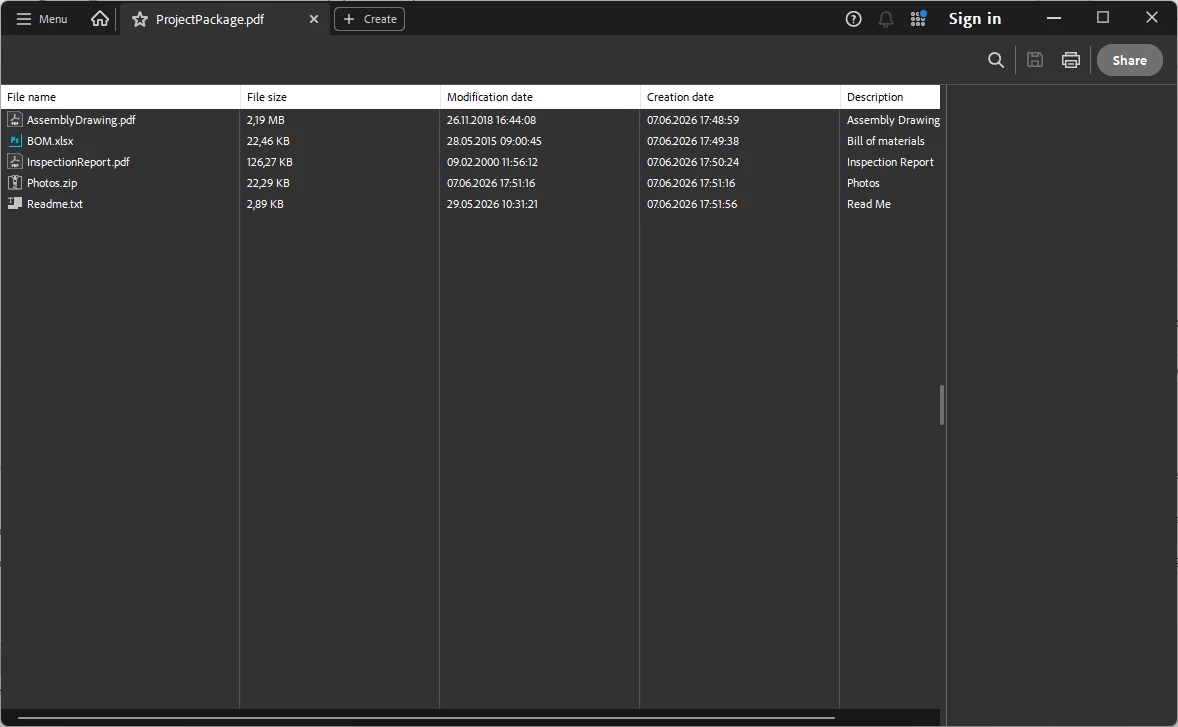
A PDF Portfolio, sometimes called a PDF Collection, is a special type of PDF document that can contain multiple files inside one PDF container.
Unlike a normal PDF document where content is stored as pages, a PDF Portfolio can preserve the original files that were added to it. These files can be PDFs, CAD drawings, spreadsheets, images, archives, text files or other document types. Applications that support PDF Portfolios allow users to browse, open and extract the embedded files.
PDF Portfolios are often used for engineering project packages, manufacturing documentation, PCB fabrication data, legal document bundles, construction documentation, technical archives and document management workflows where related files need to be distributed together.
Project Packages
Bundle drawings, reports, spreadsheets, images and supporting files into one portable PDF file.
Preserve Originals
Embedded files remain in their original format instead of being converted into regular PDF pages.
Automated Workflows
Use the SDK to create, inspect and extract PDF Portfolios in server or desktop applications.
Available PDF Portfolio and Attachment Functions
The following scConverter SDK functions can be used to extract embedded files and information from PDF Portfolio files:
HRESULT PDFAddAttachmentEx(LONG Handle, BSTR Filename, BSTR Description, VARIANT_BOOL Compress);
HRESULT PDFDeleteAttachmentEx(LONG Handle, LONG Index);
HRESULT PDFExtractAttachmentEx(LONG Handle, LONG Index, SAFEARRAY(BYTE)* Data);
HRESULT PDFGetAttachmentCountEx(LONG Handle, LONG* Count);
HRESULT PDFGetAttachmentInfoEx(LONG Handle, LONG Index, BSTR* FileName, ULONG* FileSize, BSTR* Description, BSTR* CreateDate, BSTR* Mime);
HRESULT PDFSaveAttachmentEx(LONG Handle, LONG Index, BSTR OutputFile, VARIANT_BOOL* Success);
HRESULT PDFSaveEx(LONG Handle, BSTR OutputFilename);
The following functions can be used to create new PDF Portfolio files:
HRESULT PDFCollectionInit(void);
HRESULT PDFAttachFile(BSTR Filename, BSTR Description, VARIANT_BOOL Compress);
HRESULT PDFCollectionClose(BSTR PDFOutputName, BSTR CoverPageFile);
C# Examples
The C# examples below show typical use from a .NET application using the scConverter COM interface.
Get the Number of Embedded Files
int count = 0;
long handle = -1;
converter.OpenFileEx("portfolio.pdf", ref handle);
if (handle < 0)
   return;
converter.PDFGetAttachmentCountEx(
    handle,
    ref count);

Console.WriteLine("Attachments: " + count);
Read Attachment Information
for (int i = 0; i < count; i++)
{
    string fileName = "";
    uint fileSize = 0;
    string description = "";
    string createDate = "";
    string mime = "";

    converter.PDFGetAttachmentInfoEx(
        handle,
        i,
        ref fileName,
        ref fileSize,
        ref description,
        ref createDate,
        ref mime);

    Console.WriteLine(fileName + " - " + fileSize + " bytes");
    Console.WriteLine("Description: " + description);
    Console.WriteLine("Created: " + createDate);
    Console.WriteLine("MIME: " + mime);
}
Extract an Attachment to a Byte Array
PDFExtractAttachmentEx returns the embedded file data in memory. In C#, the COM SAFEARRAY may be imported as ref Array, so the returned value can be converted to a byte[].
Array data = null;

converter.PDFExtractAttachmentEx(
    handle,
    index,
    ref data);

byte[] fileData = (byte[])data;

File.WriteAllBytes(fileName, fileData);ref Array instead of ref byte[]. This is normal for a COM SAFEARRAY(BYTE) parameter.
Save an Attachment Directly to Disk
bool success = false;

converter.PDFSaveAttachmentEx(
    handle,
    index,
    @"C:\Output\attachment.bin",
    ref success);

if (success)
{
    Console.WriteLine("Attachment saved.");
}
Complete C# Example: Extract All Attachments
int count = 0;
long handle = -1;
converter.OpenFileEx("portfolio.pdf", ref handle);
if (!handle < 0)
   return;
converter.PDFGetAttachmentCountEx(handle, ref count);

for (int i = 0; i < count; i++)
{
    string fileName = "";
    uint fileSize = 0;
    string description = "";
    string createDate = "";
    string mime = "";

    converter.PDFGetAttachmentInfoEx(
        handle,
        i,
        ref fileName,
        ref fileSize,
        ref description,
        ref createDate,
        ref mime);

    Array data = null;
    converter.PDFExtractAttachmentEx(handle, i, ref data);

    byte[] fileData = (byte[])data;

    string outputFile = Path.Combine(@"C:\Output", fileName);
    File.WriteAllBytes(outputFile, fileData);
}
Creating PDF Portfolio Files in C#
Creating a PDF Portfolio with scConverter is a three-step process: initialize the collection, attach one or more files, and close the collection to save the final PDF Portfolio.
Initialize a New PDF Portfolio
converter.PDFCollectionInit();Add Files to the Portfolio
converter.PDFAttachFile(
    @"C:\Project\AssemblyDrawing.pdf",
    "Assembly drawing",
    true);

converter.PDFAttachFile(
    @"C:\Project\BOM.xlsx",
    "Bill of materials",
    true);

converter.PDFAttachFile(
    @"C:\Project\Images.zip",
    "Reference images",
    true);
Save the PDF Portfolio
converter.PDFCollectionClose(
    @"C:\Output\ProjectPackage.pdf",
    @"C:\Project\CoverPage.pdf");
The optional cover page PDF can be displayed by PDF viewers that do not support PDF Portfolio functionality.
Complete C# Example: Create a PDF Portfolio
converter.PDFCollectionInit();

converter.PDFAttachFile(
    @"C:\Project\AssemblyDrawing.pdf",
    "Assembly drawing",
    true);

converter.PDFAttachFile(
    @"C:\Project\BOM.xlsx",
    "Bill of materials",
    true);

converter.PDFAttachFile(
    @"C:\Project\ReadMe.txt",
    "Project notes",
    true);

converter.PDFCollectionClose(
    @"C:\Output\ProjectPackage.pdf",
    @"C:\Project\CoverPage.pdf");
C++ Examples
The same API can also be used from a native C++ COM client.
Get Attachment Count
LONG count = 0;
LONG handle = -1;
converter->OpenFileEx(L"portfolio.pdf", &handle);
if (handle < 0)
    return;
HRESULT hr = converter->PDFGetAttachmentCountEx(
    handle,
    &count);
Read Attachment Information
BSTR fileName = nullptr;
ULONG fileSize = 0;
BSTR description = nullptr;
BSTR createDate = nullptr;
BSTR mime = nullptr;

HRESULT hr = converter->PDFGetAttachmentInfoEx(
    handle,
    index,
    &fileName,
    &fileSize,
    &description,
    &createDate,
    &mime);

if (SUCCEEDED(hr))
{
    // Use returned values here.
}

SysFreeString(fileName);
SysFreeString(description);
SysFreeString(createDate);
SysFreeString(mime);
Extract Attachment Data to Memory
SAFEARRAY* data = nullptr;

HRESULT hr = converter->PDFExtractAttachmentEx(
    handle,
    index,
    &data);

if (SUCCEEDED(hr) && data != nullptr)
{
    BYTE* bytes = nullptr;

    hr = SafeArrayAccessData(data, reinterpret_cast<void**>(&bytes));
    if (SUCCEEDED(hr))
    {
        LONG lowerBound = 0;
        LONG upperBound = 0;

        SafeArrayGetLBound(data, 1, &lowerBound);
        SafeArrayGetUBound(data, 1, &upperBound);

        ULONG size = upperBound - lowerBound + 1;

        // bytes points to the extracted file data.
        // size contains the number of bytes.

        SafeArrayUnaccessData(data);
    }

    SafeArrayDestroy(data);
}
Create a PDF Portfolio in C++
converter->PDFCollectionInit();

converter->PDFAttachFile(
    CComBSTR(L"C:\\Project\\AssemblyDrawing.pdf"),
    CComBSTR(L"Assembly drawing"),
    VARIANT_TRUE);

converter->PDFAttachFile(
    CComBSTR(L"C:\\Project\\BOM.xlsx"),
    CComBSTR(L"Bill of materials"),
    VARIANT_TRUE);

converter->PDFCollectionClose(
    CComBSTR(L"C:\\Output\\ProjectPackage.pdf"),
    CComBSTR(L"C:\\Project\\CoverPage.pdf"));
Function Reference
Functions for managing the contents of existing PDF Portfolio files.
PDFAddAttachmentEx
Add attachments to an existing PDF Portfolio.
| Parameter | Description |
|---|---|
Handle | Handle to the loaded PDF document. |
FileName | Full path of the file to add to the PDF Portfolio. |
Description | Optional description for the attached file. |
Compress | Set to VARIANT_TRUE to compress the file when possible. |
PDFDeleteAttachmentEx
Delete an attachment from an existing PDF Portfolio.
| Parameter | Description |
|---|---|
Handle | Handle to the loaded PDF document. |
Index | Zero-based attachment index for the attachment to delete. |
PDFGetAttachmentCountEx
Returns the number of embedded files available in the PDF document or PDF Portfolio.
| Parameter | Description |
|---|---|
Handle | Handle to the loaded PDF document. |
Count | Receives the number of embedded files. |
PDFGetAttachmentInfoEx
Returns metadata for an embedded file.
| Parameter | Description |
|---|---|
Handle | Handle to the loaded PDF document. |
Index | Zero-based attachment index. |
FileName | Receives the original file name. |
FileSize | Receives the file size in bytes. |
Description | Receives the optional attachment description. |
CreateDate | Receives the attachment creation date, when available. |
Mime | Receives the MIME type, when available. |
PDFExtractAttachmentEx
Extracts an embedded file to memory and returns the file data as a byte array through a COM SAFEARRAY.
| Parameter | Description |
|---|---|
Handle | Handle to the loaded PDF document. |
Index | Zero-based attachment index. |
Data | Receives the extracted file data as SAFEARRAY(BYTE). |
PDFSaveAttachmentEx
Extracts an embedded file and saves it directly to disk.
| Parameter | Description |
|---|---|
Handle | Handle to the loaded PDF document. |
Index | Zero-based attachment index. |
OutputFile | Full path of the output file. |
Success | Receives VARIANT_TRUE if the file was saved successfully. |
PDFSaveEx
Save a modified PDF Portfolio file to a new PDF file.
| Parameter | Description |
|---|---|
Handle | Handle to the loaded PDF document. |
Filename | Full path and file name of the output PDF Portfolio file. |
Function Reference
Functions used to create new PDF Portfolio files.
PDFCollectionInit
Initializes a new empty PDF Portfolio collection.
PDFAttachFile
Adds a file to the currently open PDF Portfolio collection.
| Parameter | Description |
|---|---|
Filename | Full path of the file to add to the PDF Portfolio. |
Description | Optional description for the attached file. |
Compress | Set to VARIANT_TRUE to compress the file when possible. |
PDFCollectionClose
Closes the current PDF Portfolio collection and saves it to disk.
| Parameter | Description |
|---|---|
PDFOutputName | Full path of the PDF Portfolio file to create. |
CoverPageFile | Optional cover page PDF file to display in PDF viewers that do not support PDF Portfolio files. |
Typical Applications
PDF Portfolio support is useful in many applications where related files must be stored, exchanged or archived together.
- Document management systems
- Engineering and CAD project packages
- Manufacturing documentation workflows
- PCB design and fabrication archives
- Construction project documentation
- Legal and contract document bundles
- Server-side PDF processing and extraction
- Custom automation tools using COM, C# or C++
Frequently Asked Questions
What is a PDF Portfolio?
A PDF Portfolio is a PDF container that can hold multiple files while preserving their original formats. Unlike a traditional PDF, the embedded files are not converted to PDF pages.
Can a PDF Portfolio contain non-PDF files?
Yes. PDF Portfolios can contain spreadsheets, CAD drawings, images, ZIP archives, Office documents and virtually any file type.
Can scConverter extract files from a PDF Portfolio?
Yes. The SDK provides functions to retrieve attachment information, extract files directly into memory, or save them to disk.
Can scConverter create PDF Portfolio files?
Yes. Using PDFCollectionInit, PDFAttachFile and PDFCollectionClose, applications can generate PDF Portfolio files programmatically.
Which programming languages are supported?
The COM-based SDK can be used from C++, C#, VB.NET, Delphi, ASP.NET, VBA and other COM-compatible environments.
Add PDF Portfolio Support to Your Application
With scConverter SDK, developers can create, inspect and extract PDF Portfolio files directly from their own Windows applications and automated workflows.


